Where do you use the fishing or Lost Key?
The Old or Lost Key from the completed Fishing Paper is used in the Timesville hidden window-lock sequence. First complete the paired-room puzzle; then switch to windowed mode and re-enter the smaller room to reveal the lock. Follow the detailed window-lock steps if you already have the key. The Office Core Key is a different item.
I already have the fishing key: what next?
If the Old or Lost Key is already in your inventory, you do not need to catch the fish again. Finish the paired-room puzzle, enter the smaller room, and listen for its reversed voice. Leave, switch to windowed mode and re-enter the same room; use the key on the lock. See the numbered lock steps.
Before you start
This is the fish-collection key used in the Timesville secret route. Some community guides call it the Lost Key, while players also call it the Old Key. The Office Core Key is a different item: use the water-cooler guide for that chain.
You need access to Timesville fishing, the Metal Detector, and the Fishing Paper. Use the fishing and detector steps below if either is missing. The full walkthrough provides the surrounding route overview.
Keep a separate Chapter I save before the area's boss progression. This is a precaution from the community Ending C guide ↗, not a claim that every later save is permanently blocked.
Unlock fishing
Complete Catthew's three hide-and-seek encounters and receive the Fishing License. Show it to the diver at the beach fishing deck, then use the rod. Check the community achievement walkthrough ↗ if the cat's dialogue has not advanced.
Get the Metal Detector
- Obtain the Telescope from Paisley's party in the lodge. The party password is Yellow; talk to the aquarium residents for the invitation after progressing fishing.
- At Night 3, use the Telescope beside the locked beach shack and connect the stars to open it.
- Inside, set the four fossils, left to right: first upright, second highest, third highest, fourth with arms spread.
- Pull the string, let the insects cross, then lower the fossil holding the detector and step back to collect it.
These prerequisites follow the achievement walkthrough ↗. The detector is also needed for the Projector Remote.
Find the Fishing Paper
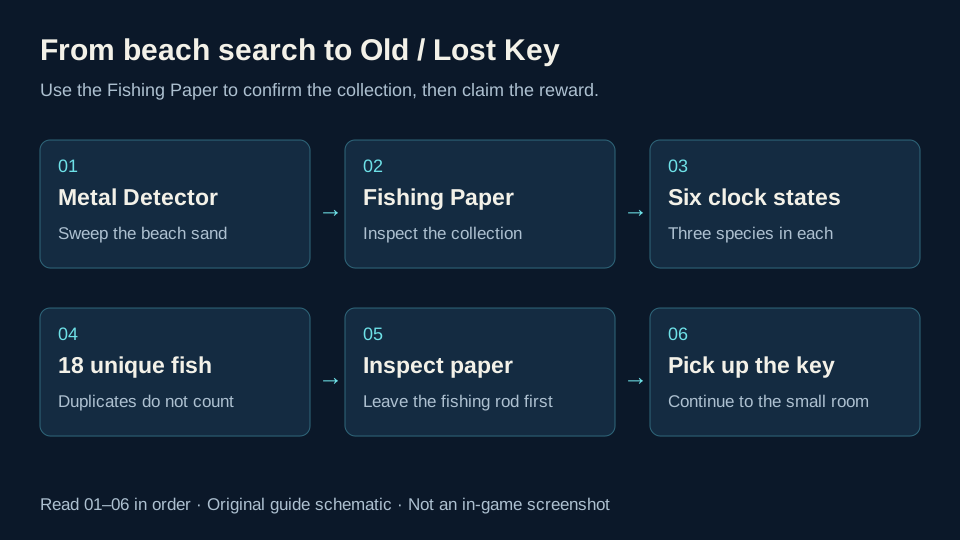
- Bring the Metal Detector to the Timesville beach.
- Sweep the sand and follow the detector response to a dig point; inspect the recovered item to confirm it is the Fishing Paper, rather than another buried item.
- Inspect the paper to see the fish collection slots.
Finding the paper does not immediately award the key. The key is inside the completed collection. The Timesville secret guide ↗ documents the paper → collection → key sequence.
Whether every catch made before finding the paper fills its slots retroactively is not confirmed by these sources. Collect the paper first when planning a fresh run.
Read the clock and advance time
Match the pointer position: Day 1 upper-right, Day 2 top, Day 3 upper-left, Night 1 lower-left, Night 2 bottom, Night 3 lower-right. These labels follow the fishing guide's annotated clock ↗.
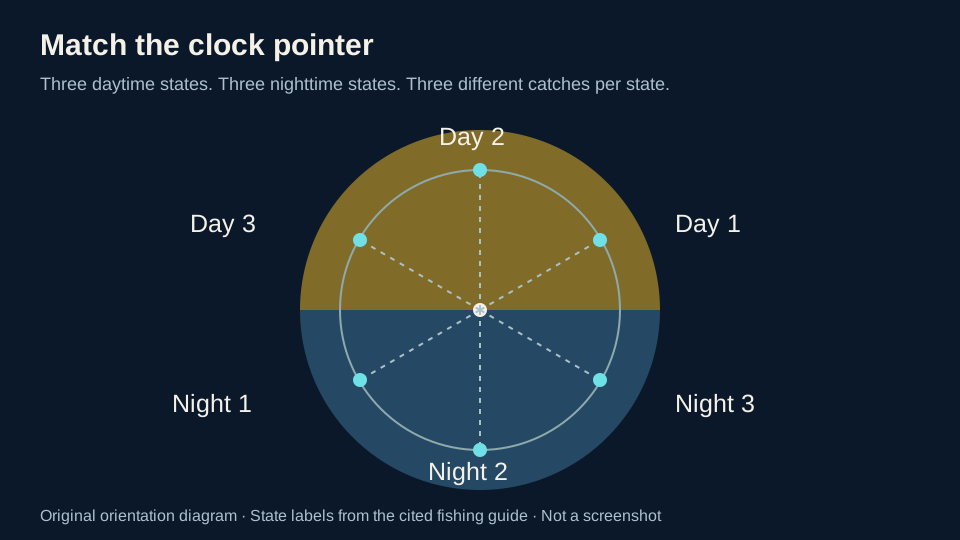
Entering buildings or changing locations advances the town's time cycle. Leave fishing, use a nearby building transition, then check the clock again before casting. Staying at the rod is not a reliable way to select a new state. This behavior is described in the achievement guide ↗.
All 18 fish by time period
There are six day and night states, each with three different catches. Match the current clock state to the row below. Repeated catches do not replace a missing species.
| Clock state | Fish 1 | Fish 2 | Fish 3 |
|---|---|---|---|
| Day 1 | Nautilus | Colisa Lalia | Jantic Fish |
| Day 2 | Peter Panini | Seahorse | Singin' Fish |
| Day 3 | Eel | Reddest Fish Ever | Sea Man |
| Night 1 | Pirate | Skele-Fish | RC Ship |
| Night 2 | Crab | Starfish | Big Worm |
| Night 3 | Drawing of a Fish | Jelly | Crate |
Fish names and clock-state groups follow penguinleader911's fishing guide ↗. Open its clock image if you are unsure how its Day 1–3 and Night 1–3 labels match the dial. The blurred ??? catch is excluded from the guide's 18-fish achievement list.
Check the Fishing Paper as you go. If one fish is missing, return to that row's time state instead of repeating every part of the day.
Your fish progress
Use Show missing only to hide fish you have already checked. Completed time periods disappear from that view, so you can focus on the clock states you still need. The checklist stays on this device; compare it with the Fishing Paper in your game.
Your 18-fish checklist
Tick the items you have collected. With JavaScript enabled, progress is saved only in this browser.
All 18 fish are checked. Show all to review them against your Fishing Paper, then claim the key.
Check the clock positions · Already have the key? Find the lock
This is your personal checklist; it does not read or change your game save. Storage details
Claim the Old or Lost Key
- Finish all 18 different collection slots.
- Leave the fishing minigame.
- Inspect the completed Fishing Paper again.
- Collect the key released by the paper.
The fishing achievement and obtaining the key are separate checks. If you earned the achievement but cannot see the key, recheck the paper itself rather than the fishing NPC.
Complete the shared-room puzzle
The smaller dollhouse and its larger counterpart share a room arrangement. During daytime, check the photo visible through the beach wall opening, then set the small room to match it:
- Move the little table left, under the wall appliance.
- Activate the toy microwave, wait for its completion sound and open it so the orange object lands on the table.
- Set the picture to three birds.
- Turn on the light with its hanging cord; place the fan sticker at the other ceiling cord.
- Visit the corresponding larger room and collect the VHS tape from the television. Return to the smaller room and check that it has changed to monochrome.
Use the room photo as the reference if an object was already moved. Check the thermostat against the photo too; Viri specifically calls it out in the guide's comments. These settings follow Neoseeker's Chapter 1 walkthrough ↗; Viri's visual walkthrough ↗ shows the transformed small room and its lock.
Use the key on the hidden window lock
The lock is in the smaller of the two lookalike rooms, after their shared puzzle is complete.
- Return to the smaller room in its monochrome state.
- Pause to hear the reversed voice hint.
- Leave the room.
- Press
Alt+Enterto switch the game out of fullscreen. - Enter the same small room again. The black opening should now appear as a large lock.
- Use the Old or Lost Key on that lock.
These are the steps shown in Viri's Timesville guide, Step 2 ↗. Its before-and-after room screenshots provide a visual reference. The keyboard shortcut is for the Windows game; a controller shortcut depends on its configured layout.
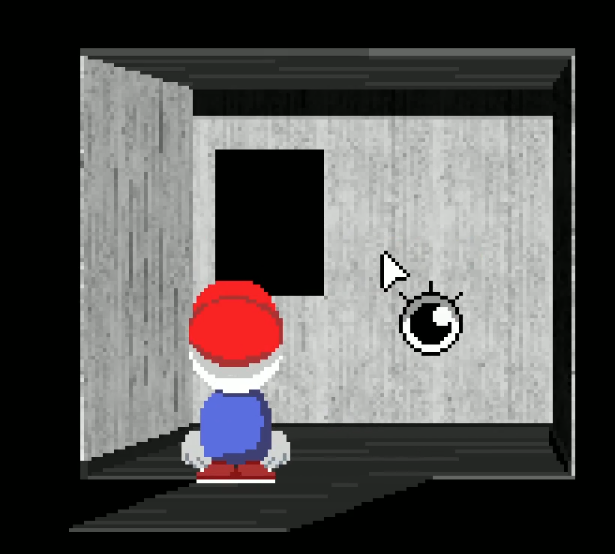
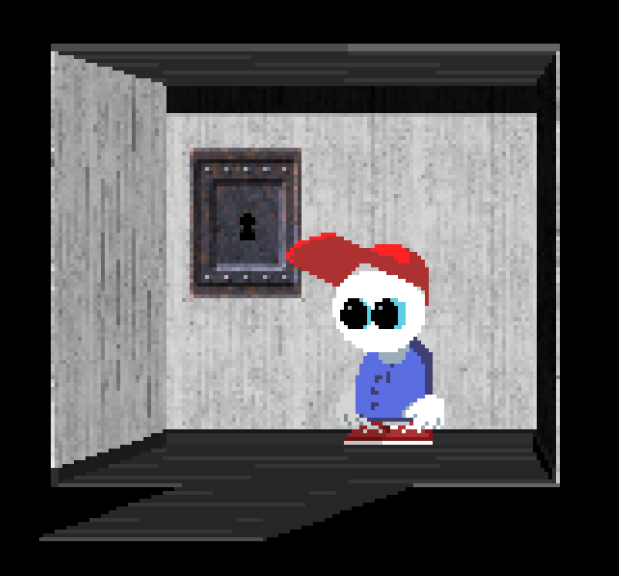
Opening the lock begins the hidden sequence, rather than finishing every Ending C requirement. Continue with the Ending C checklist, or use the secrets overview to check the other areas.
Visual references for the difficult steps
| What you need to recognize | Reference |
|---|---|
| Clock state and missing fish | All-fish guide: annotated clock and species ↗ |
| Monochrome room before switching modes | Viri’s Timesville guide, Step 2: first room image ↗ |
| The large lock after re-entering | Viri’s Timesville guide, Step 2: windowed room image ↗ |
The room images above are attributed community gameplay screenshots; the fishing diagrams are original illustrations. Compare the room state with your own game before using the key.
If a step does not work
| What you see | What to check next |
|---|---|
| Paper has empty slots | Compare the missing fish with the six time-state rows above. |
| Achievement unlocked, no key | Leave fishing and inspect the completed paper again. |
| Black opening instead of a lock | Complete the paired-room puzzle; in the smaller room wait for the reversed voice, leave, confirm windowed mode and re-enter that same room. |
| Fishing Paper is complete but the key is missing | Leave the rod and inspect the completed paper again; check inventory for the fish-route key. |
| Alt+Enter seems ineffective | Check that the game is visibly windowed; leave and re-enter after switching. On a controller, verify the mapped keyboard shortcut. |
| Same fish keeps appearing | Compare the clock pointer with its position diagram. Duplicates do not fill another species slot. |
| Key does not work on an Office door | Check whether you need the Core Key instead. |
| Your late-game save cannot reach the area | Compare with your earlier backup; recoverability is not confirmed for every route state. |
The Timesville community guide ↗ describes the voice, windowed-mode change and re-entry. The Endacopia Unstuck comparison ↗ also links player reports; it is a synthesis and does not independently prove every step. If a display-mode change still fails, consult those reports and back up your save before attempting a reload. We have not reproduced that fallback.
If another guide calls the item an “Ancient Key,” compare its acquisition steps with this fish reward. That name is not confirmed by the sources used here.
Sources used
Where this guide was checked
Facts are rewritten and organized for this guide. Official sources are preferred for game data; community guides are used for route details.
The six fishing groups match the All Fish guide and xixi’s separate account. Timesville Secret links All Fish and is not counted as an independent fish-table check.
- Steam Community all-fish guide — species and clock states ↗
- Steam Community Timesville guide — key and window lock ↗
- Steam Community all-endings guide — route and save preparation ↗
- Steam achievement guide — fishing access, detector and time progression ↗
- Neoseeker Chapter 1 — shared-room setup ↗
- Endacopia Unstuck — key, room sequence and troubleshooting (community synthesis) ↗
Does your game behave differently?
Include the heading, game version, platform and what you expected. Source review does not mean every route was replayed on every build.
Report a correction on GitHub ↗Opens a draft public issue for you to review and submit. A GitHub account is needed. Contact details